
TrueInsight
Siemens/Altair Channel Partner
Menu


Altair Installation Troubleshooting
Find solutions to common Altair installation, licensing, and access issues.

Troubleshoot Altair Installation and Licensing Issues
Identify and resolve common setup, authentication, and access problems across Altair tools.
Whether you're dealing with license errors, configuration issues, or access restrictions, this guide provides clear explanations and practical solutions to help you get your Altair environment running smoothly.
Common Altair Installation Errors
Explore common Altair errors, including licensing, configuration, and access issues, with clear solutions to fix them.
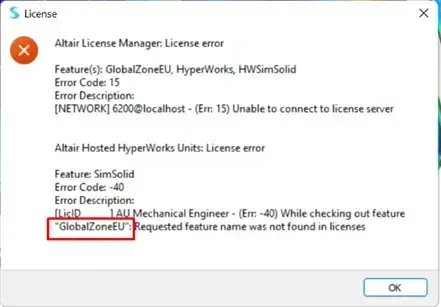
Out of Country Error
What it means: the tool is being accessed from outside the US region. How to fix it: adjust your machine time zone, return to the US network, or review server routing settings.
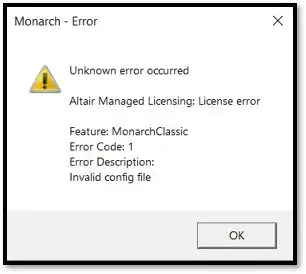
Invalid Config File Error
What it means: The license configuration is invalid or expired, and the system cannot authenticate your Altair license. How to fix it: Reauthenticate your license using the Altair License Utility. Log in again or generate a new authorization token from the Altair One portal.
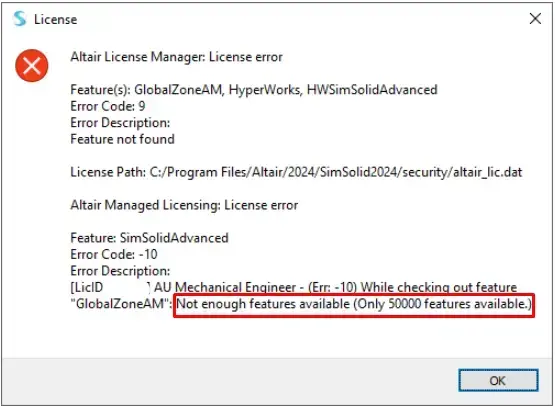
Not Enough Features Available
What it means: The tool requires more Altair Units than are currently available in your license. How to fix it: Check if other users are consuming units, close unused sessions, or verify that your license includes enough units for the selected tool.
Tool Suddenly Stopped Working
What it means: A tool that was previously working may fail due to system changes, outdated drivers, or permission issues. How to fix it: Update your graphics drivers, run the tool as Administrator, and reauthenticate your license if needed.
Alternate License Authorization
What it means: You can authorize your Altair license using an authentication token instead of standard login. How to fix it: Log in to the Altair One portal, go to your profile, generate an auth code, and enter it into the license utility.
Installation and License Support Video Library
Explore detailed tutorials and walkthroughs covering Altair setup, authentication, and troubleshooting workflows.

Altair One Portal Overview
Altair One™ is a single portal for Altair’s products, accessible anywhere via standard workstations, PCs, laptops, and mobile devices. Download softwa...

Visualizing Altair Usage Reports
In this video, we review how to parse the Altair Usage data for a managed license. This is another feature that comes with the Altair One feature, ma...

Installing Altair Monarch
Welcome to our comprehensive guide on how to install Altair Monarch, the powerful data transformation and analysis tool. In this video, we'll take you...

Using Altair One to install Altair Data Analytics Tools
In this video, we walk you through the process of installing Altair Data Analytics Tools from the Altair One platform. Related Videos: https://www.y...
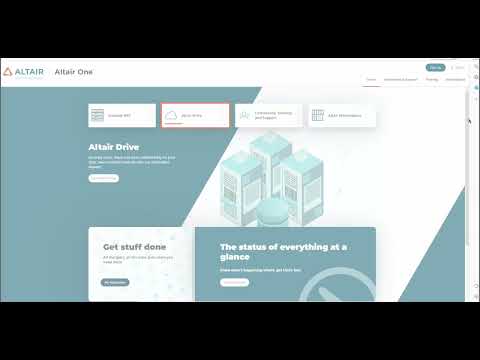
Altair Trial Activation Methods
Altair offers free trials for end users to get their hands on the software prior to purchasing. In this video we will walk through a few of the diffe...

Borrowing or Checking out an Altair License
We decided to make a short video out of one of our most frequented blog posts, How to Borrow/Checkout an Altair license. https://www.trueinsight.io/...
Support

Need Help with Altair Installation or Licensing?
Get expert support to resolve installation issues, license errors, and configuration problems.
Our team helps engineering teams troubleshoot Altair tools, fix licensing issues, and ensure your environment is properly configured so you can get back to work quickly.
Altair Installation & Licensing FAQs
This happens when the tool is accessed from outside the allowed region (typically the US). Adjust your time zone, network location, or server routing settings.
You need to reauthenticate your license. Use the Altair License Utility or generate a new auth token from the Altair One portal.
This means your license does not have enough Altair Units available. It may also happen if other users are currently using those units.
Yes. You can generate an authentication token from your Altair One profile and use it in the license utility.
This can be caused by outdated drivers, permission issues, or license expiration. Try updating drivers, running as Administrator, or reauthenticating your license.
If you’ve tried the solutions above and the issue persists, or if you're dealing with configuration or licensing setup problems, it’s best to contact support for assistance.
Still Having Issues with Altair Installation or Licensing?
Get expert help to resolve setup, licensing, and configuration issues quickly and efficiently.